
51 Services for Automating an Education Business
In short: The catalog of 51 services helps schools and tutors choose an automation system without weeks of searching. Services are divided into four types: CRM, ERP, LMS and online platforms; the catalog offers a needs-based selection, a 20-feature matrix, prices for 10-800 students and recommendations for eight types of education business.
Sooner or later every tutor and every school reaches the point where spreadsheets and notes on the phone are no longer enough. The schedule gets tangled, payments have to be reconciled by hand, and homework gets lost in messengers. That is when the question comes up: which system to choose.
Below we look at why this choice is so hard, how CRM, ERP, LMS and online platforms differ, and how a catalog of 51 services on the Ukrainian market helps you find your option without weeks of searching.
Why choosing a system is so hard
There are now many services for education businesses in Ukraine, and new ones appear every year. The problem is that comparing them with one another is almost impossible.
Every website describes itself in its own way
One service calls itself a CRM, another a platform, a third “all in one”. The same words often hide different features, and different words hide the same ones.
Prices are calculated by different rules
Some charge per student, some per teacher, some have a single plan. The currencies differ too: hryvnia, dollar, euro. To understand how much a service will cost you specifically, you have to do the math by hand.
It is unclear what exactly to look for
A tutor who wants to keep a schedule and see debts needs one thing. A language school with groups, teacher salaries and homework needs something quite different. Until you understand which type of system you need, comparing specific services is pointless.
CRM, ERP, LMS and online platform: what is the difference
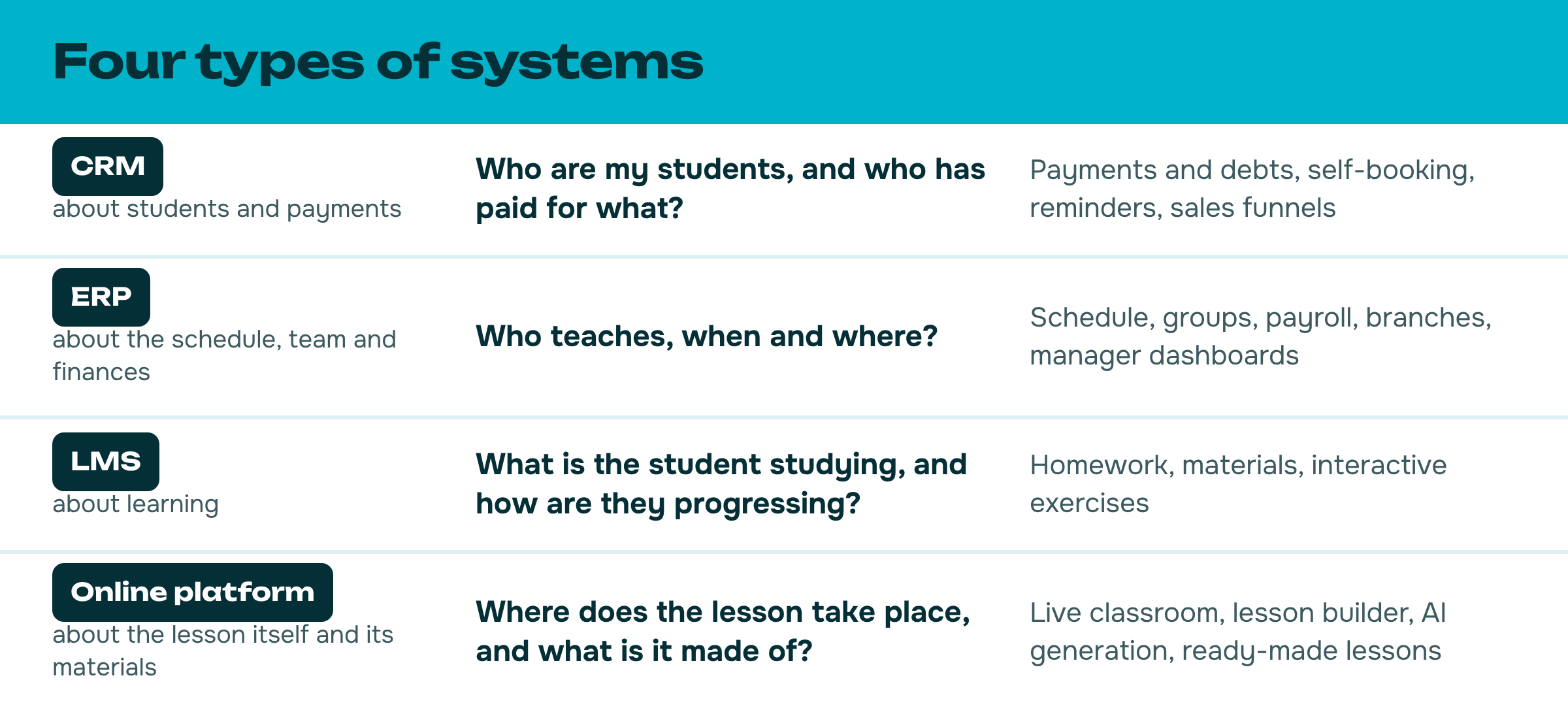
In the catalog, all services are divided into four types of systems. Each type answers its own question.
One system or several
CRM and ERP handle administration; LMS and the online platform handle the learning process. Many services combine several roles, but there is usually no single service for everything. That is why schools often take a pair: one system for money and scheduling, another for lessons.
An ERP comes in handy for a tutor too. Scheduling belongs to it, and payroll calculation shows how much of what you earned you can take for yourself and how much to leave for taxes and service fees.
What is inside the catalog
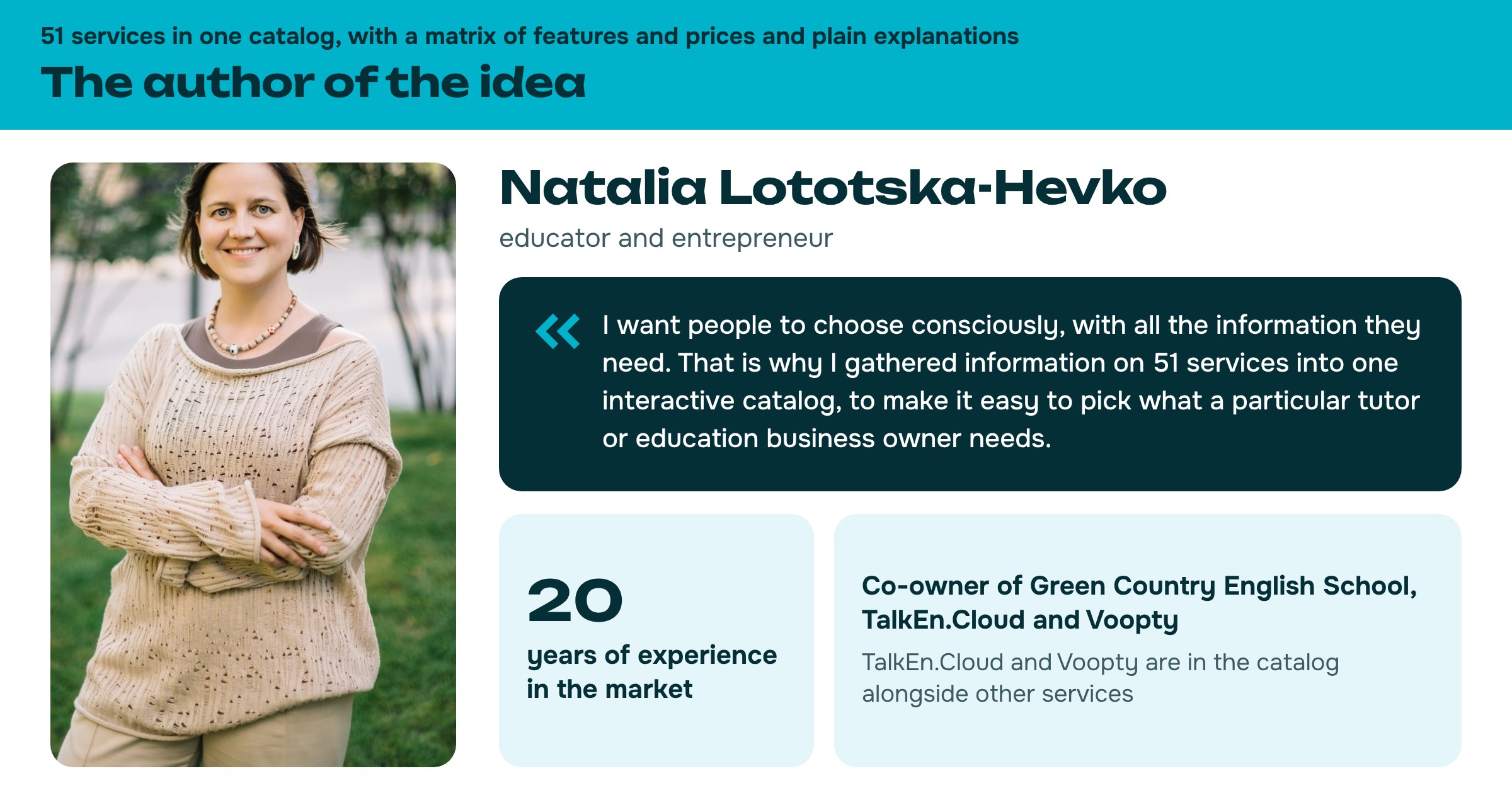
The catalog of services for schools and tutors is an interactive web page that opens in a browser on a computer or a phone. It brings together 51 services on the Ukrainian market and six tools for working with them. The catalog itself is in Ukrainian.
Selection for your needs
You mark who you are and what you want to automate. The catalog names the type of system or a combination and shows the services that fit fully or almost fully.
Feature matrix
One table in which services are compared across 20 features: from scheduling and payments to sales funnels, telephony, payroll, a lesson builder and AI generation. Each feature has a mark next to it: yes, partial, no or unclear.
Pricing by scenario
How much each service costs per month for 10, 25, 60, 250 and 800 students. The cards can be sorted starting from the cheapest.
Recommendations by business type
61 ready-made answers to requests such as “just scheduling, booking and money” or “sales department: funnel, telephony, LTV”. The recommendations are organized by eight types of education business: from a tutor to large course providers and general education schools.
STOP list
11 Russian platforms that still turn up in Ukraine, and the Ukrainian services that can replace them.
Glossary in plain words
Explanations of the system types, the marks on the cards and terms such as LTV, white label or webhooks.
How the selection works
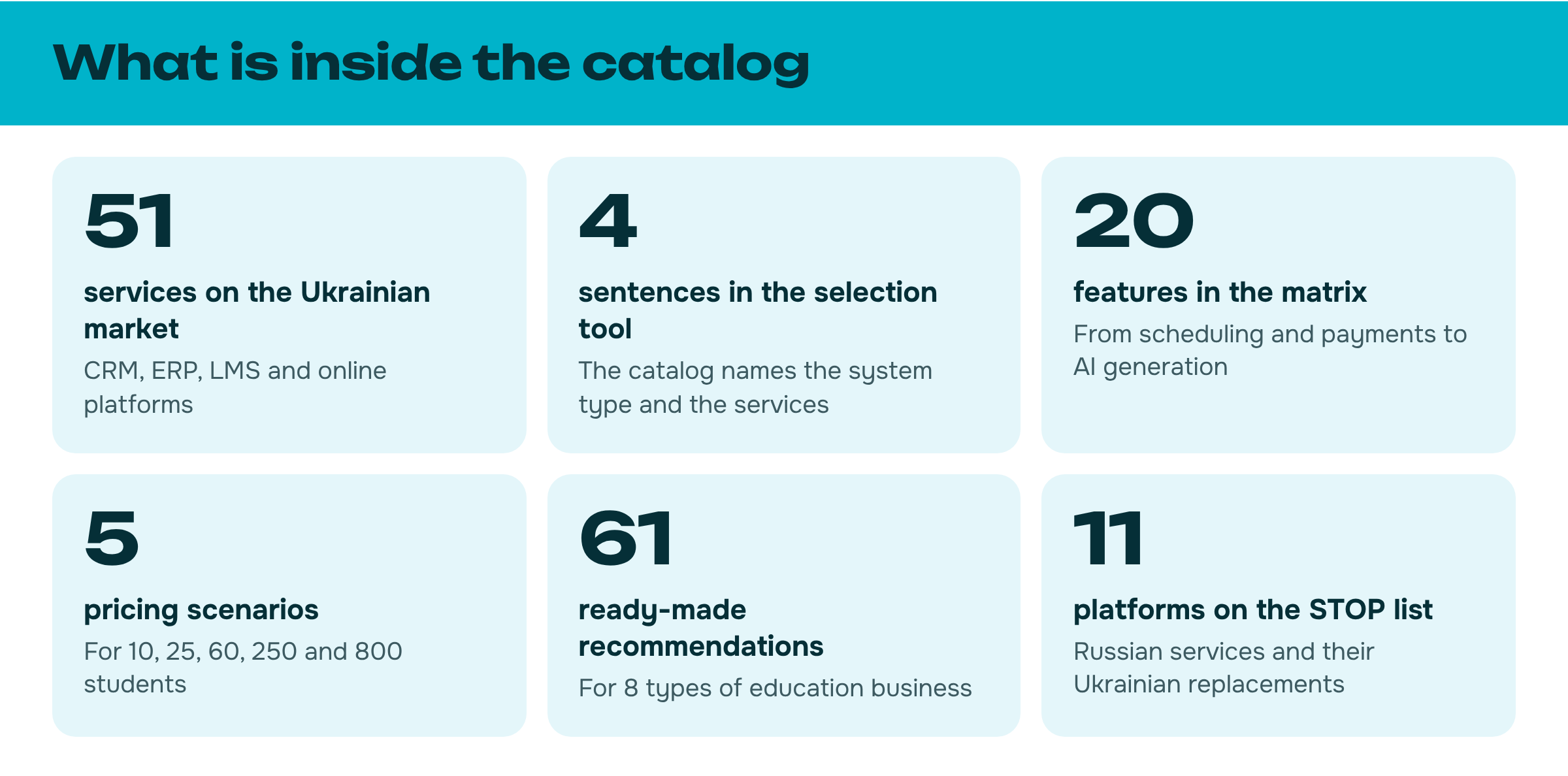
The selection tool replaces filters with four sentences about you. In each one you mark everything that suits you.
- I am: a tutor, or I run a small school, a studio, English courses or a general education school.
- I want to automate: scheduling, tracking of payments and debts, homework, sales funnels and more.
- I prefer services that are: any, pioneers, time-tested, newcomers or very recent.
- I want to sort by: relevance, price or alphabet.
Example
A tutor wants to automate scheduling and the tracking of payments and debts. The catalog answers: “Then a CRM + ERP combination will suit you”. Payment tracking is covered by the CRM, scheduling by the ERP.
Next, the catalog shows the services that have it all in one: as of the publication date there are 16 of them out of 51. After them come the alternatives, with a note on what exactly each of them doesn’t cover.
Who the catalog is for
- Tutors who have outgrown spreadsheets and notes on the phone.
- Owners of schools, studios and courses who are choosing their first system.
- Managers who want to change their service and compare the alternatives.
What not to expect from the catalog
The catalog does not replace testing. The data comes from the services’ official websites, pricing pages, the App Store and Google Play; the products themselves were not tested. A “yes” mark means the feature is declared on the service’s website.
Prices and features of services change. So the catalog helps narrow the choice down to two or three options, and the final terms are worth checking on the website of the chosen service and during the trial period.
How to get the catalog
Access to the catalog costs UAH 399. It is a one-time payment; access is open for 6 months and is tied to the email you give at purchase.

Conclusion
Choose a system based on your own tasks, not on the names of services. First define what exactly you want to automate, then work out which type of system covers it, and only then compare specific products by features and price. The catalog takes you along exactly this path.
FAQ
How do CRM, ERP, LMS and online platforms differ?
CRM and ERP handle administration (clients, money, scheduling), while LMS and online platforms handle learning. That is why schools often take a pair: one system for money and scheduling, another for lessons.
How many services cover both scheduling and payment tracking?
As of the publication date, 16 out of 51. The catalog shows them first, followed by alternatives with a note on what each does not cover.
Can I trust the marks in the catalog?
The data comes from the services’ official websites, pricing pages, the App Store and Google Play; the products themselves were not tested. So the catalog does not replace testing before you choose.